
Captain's Log keeps track of the Odyssey exobiology side of things - the bio and geo signals you pick up, and the lifeforms you sample and analyse.
Captain's Log now works out each species' habitat profile from your survey history and predicts which species you'll find on a body before you land - with the odds, the Vista Genomics payout, and even the likely colour variants. That's a whole feature in its own right, so it has its own page: Galactic Genomics.
When you sweep a system with the Fuel Scoop System, Captain's Log records a count of the bio signals and geo signals found on each planet. These counts show up in the Planets panel and on the Overlay, so you can spot at a glance which bodies are worth landing on to look for life.
The BioTracker kicks in the moment you take the first sample of an organic lifeform. It then keeps track of the whole three-sample process for you:
It also shows a running count of species scanned, and a separate count of species fully analysed.
Handy touch: if you stop playing part-way through a lifeform's samples, the BioTracker's state is saved. Restart Captain's Log and it picks up exactly where you left off, so you don't lose track of a half-finished specimen.
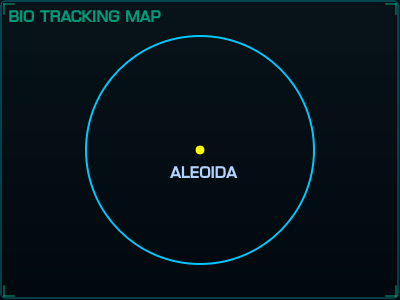
The Bio Tracking Map is a graphical overlay showing the radius of the minimum sample distance for each sample point, plus an updated marker for where your CMDR currently is. It makes judging those sample distances a lot easier than reading a number. You can turn it on or off in the Overlays tab of the Configuration Manager.
If you've analysed biolife on a planet, that information is also shown in the planet info area of the main window for that planet, so you've got a record of what you found there without needing the overlay up. The same panel shows the Exobio Type Prediction verdicts - what's confirmed on the body and what's still possible - see Galactic Genomics.
Update your browser to view this website correctly.