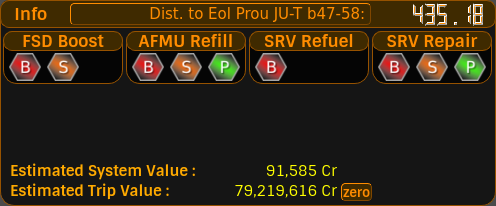
Currently, the Info Panel is used to display useful information such as;
Distance to <target destination> : your current distance to target destination system relative to your current location in the galaxy. This is a pushbutton. To change your target destination, click this button and a Target Destination Panel will be displayed.
FSD Boost Materials : This indicates that in this one system, that you have scanned landable planets which have sufficient materials in order to collect various grades of FSD Boost Materials for Synthesis.
Auto Field Maintenance Unit (AFMU) refill Materials : This indicates that in this system, you have scanned landable planets which have sufficient materials in order to collect various grades of AFMU Refill for Synthesis.
Surface Recon Vehicle Refuel Materials : This indicates that in this system, you have scanned landable planets which have materials available to collect for various grades of SRV Refuel synthesis.
Surface Recon Vehicle Repair Materials : Indicates you have scanned landable planets which have materials available to collect for various grades of SRV Repair synthesis.
If you have scanned landable planets and there are no suitable materials for those types of Synthesis, these panels will not be displayed.
There are three grades of synthesis;
These icons are clickable. When you click one, the large panel to the right of the main window switches to display the System Materials Panel.
Below the synthesis indicators, the Info Panel shows an Estimated System Value - a running estimate of what the star and planet scans you've made in the current system are worth - and an Estimated Trip Value, which is the running total for the whole trip.
There's a zero button next to the Trip Value. Click it and the Trip Value is zeroed, like resetting a trip odometer, so you can measure the value of a single journey. A recall button then appears which brings the full trip total back. Handy for working out what one particular run is worth without losing your overall figure.
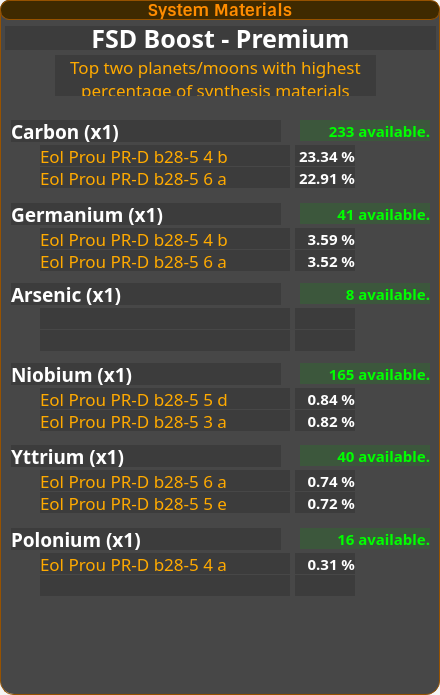
This panel appears when you click one of the synthesis grade icons.
This panel tells you the first two planets in that star system with the highest % of the synthesis materials required for that particular grade of synthesis. In the example above, it is displaying the first two planets in the system with the highest % of materials available for the FSD Boost Premium synthesis recipe.
The numbers in green show you how many of these materials you currently have.
Update your browser to view this website correctly.