 Captain's Log
Commanders & Journal Archive
Fly more than one Commander? Captain's Log now knows about every commander in your journal archive - who flew what, when, and where their records live. Two buttons in the main window's top bar open two windows, because they answer two different questions:
- The Trips button opens the TRIPS window - "what am I flying right now, and what should I fly next". It belongs to the commander the game says is playing, and it cannot be pointed at anybody else.
- The CMDRs button opens the COMMANDERS window - "who has ever flown here, and what did they do": the cards, the unassigned legacy trips, the journal folders, and building anybody's trip.
Both windows hang off one brain: every fact either one shows comes from the same archive index and the same trip records, so opening one can never make the other lie. Both remember their own size and place too - widen the card wall until every commander fits, close the window, and it comes back that shape forever.
The first time you open either window after a change to your journal folders, the archive scan runs while you watch: the window appears at once and a progress bar ticks through the journal files, then a second pass indexes your trip databases. It's all read-only, so there's nothing to cancel - just a window that admits it's working.
The shared star database (GALAXY.db) is not split per commander - star
systems and bodies are facts about the galaxy, not about who found them, so
they stay in one place.
The COMMANDERS window
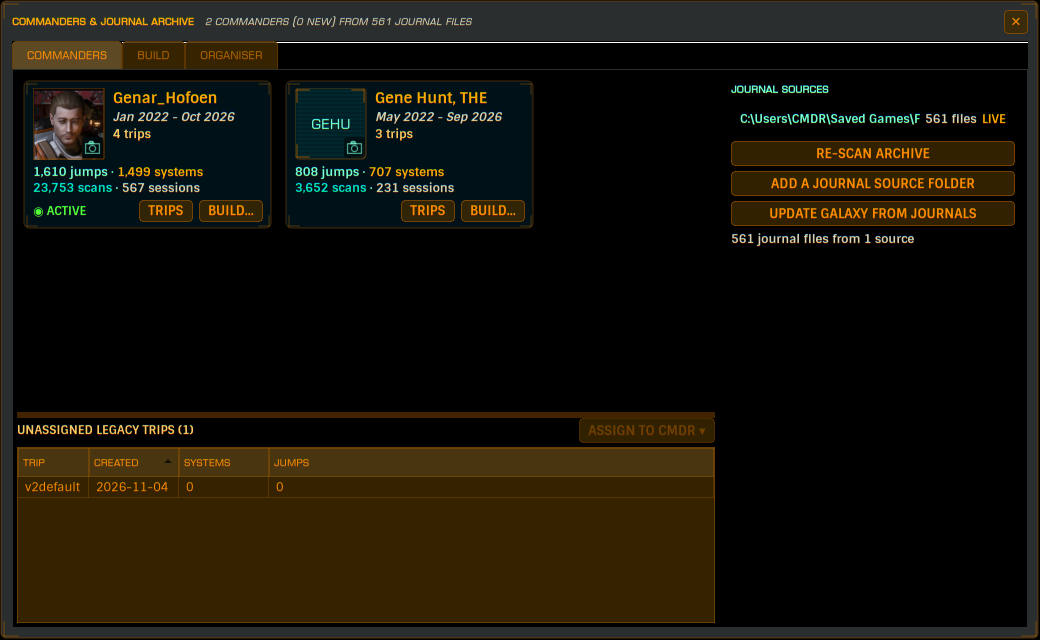
The COMMANDERS tab holds one card per commander found in your journals: their name, the dates they flew, an avatar, their archive totals - jumps, scans, unique systems and sessions - and how many trips belong to them. A card whose commander has no journals in your configured folders says so in place of the totals, rather than showing numbers you can no longer check. And a commander with neither journals nor trips gets no card at all: the wall shows what your records say today, not a memory of records that used to.
Under each card:
- TRIPS - this button has two personalities, decided by who is flying. On the current commander's card it opens the TRIPS window on their list. On anybody else's it opens their trips as a menu - one entry per trip, each with BIND TO COMMANDER, UNBIND COMMANDER, SET AS DEFAULT and DELETE TRIP, because those trips have no other door. SET AS ACTIVE is there but greyed: switching to a trip belonging to somebody the game is not playing as is precisely the mistake this window exists to prevent.
- BUILD... - opens this window's BUILD page showing that commander's jump table (this window's page can be pointed at anybody). Double-clicking the card does the same thing.
- The picture box - click it to set or change the commander's photo. CHOOSE PHOTO... picks a new one; REMOVE PHOTO puts the initials plate back. Your image is scaled down and stored in Captain's Log's own database - nothing is uploaded anywhere and your files are left alone.
Below the cards is the UNASSIGNED LEGACY TRIPS strip: trips that belong to nobody - which is what all of your existing ones will be the first time you run this version, until the first-run upgrade claims the one you're already using (see Who owns which trip below). Double-click a row to fly it. Select rows with Ctrl+click / Shift+click and the ASSIGN TO CMDR button lights up saying how many you picked; choose a commander and, after asking first, Captain's Log records that commander as the owner inside the files and moves them into a folder named after them - so who owns what is legible in a file manager too. It refuses rather than guessing: it will not move the trip Captain's Log has open (switch first), and it will not rename a file onto a name that's already taken. Once the strip is empty it hides itself.
The window's right-hand side lists your journal source folders. By default Captain's Log reads the folder Elite writes journals to; ADD A JOURNAL SOURCE FOLDER lets it read others as well - an archive on a backup drive, a second install. Everything this window knows - the cards, their totals, and who the game is being played as - comes from those folders and nothing else. Each folder shows how many journal files it holds, in red if the folder has gone missing, and RE-SCAN ARCHIVE re-reads them all. A journal file that appears in two folders is only counted once.
Underneath sits UPDATE GALAXY FROM JOURNALS - the one journal job that
belongs to no commander. It reads every journal in those folders into the
shared GALAXY.db: no trip, no date range, and it won't start while a trip
build is running. It is the slowest thing in Captain's Log - expect a couple
of minutes on a full archive - so it has its own progress bar and cancel.
Who owns which trip
A trip can have an owner two ways, and either one is enough:
- it sits inside a folder named after the commander in your data directory, or
- it carries a binding recorded inside the file.
On the first run of a version with multi-CMDR support, Captain's Log looks at your newest journal, reads who was flying, and gives the trip you are already using to that commander - moving the file into their folder and recording the owner inside it. It only does this once, and only if nothing else has an owner yet, because a wrong guess is worse than no guess. It says so when it starts, and hovering the trip label at the bottom of the main window tells you who owns it and who decided:
CMDR Genar_Hofoen Assigned by Captain's Log from your most recent journal, on 15 Oct 2026. Change it in the Commanders & Journal Archive window if that is wrong.
If that guess is wrong, fix it: right-click the trip (in the TRIPS window or the legacy strip) or reach it through its commander's card menu and pick BIND TO COMMANDER. The current owner is ticked, OTHER (type a name)... covers a commander whose journals are long gone, and UNBIND COMMANDER takes the owner back off.
The TRIPS window
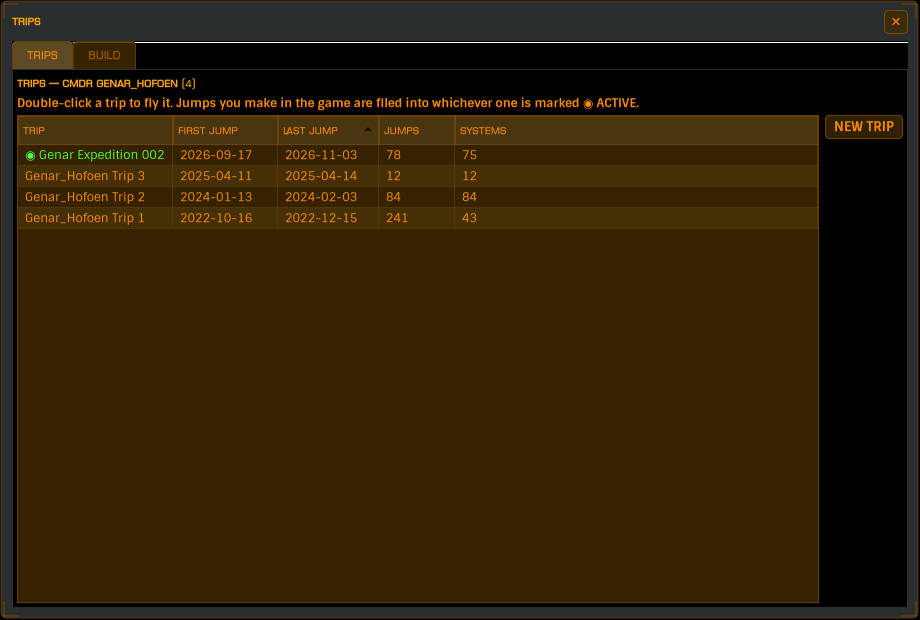
Its TRIPS tab is the flying tab. It belongs to the current commander - whoever the journals say you're playing as - and lists only their trips: TRIP, FIRST JUMP, LAST JUMP, JUMPS, SYSTEMS, newest first. It is never pointed at somebody else, because the one dangerous control in the window lives here: making a trip active. Fly the wrong commander's trip and every jump you make starts landing in it - so this page retires the danger by construction rather than by refusal. Who is current is worked out in order of honesty: the commander the game last loaded as, failing that the owner of the trip Captain's Log is filing into, failing that the most recently seen card.
The things you can do to a row:
- Double-click to fly that trip. Jumps you make in the game are filed into whichever row is marked ACTIVE.
- Right-click for the menu: SET AS ACTIVE, BIND TO COMMANDER, SET AS DEFAULT and DELETE TRIP.
NEW TRIP beside the table starts a blank trip for the commander the page belongs to: you name it, it's filed in their folder and bound to them, and a Switch to this new trip box in the prompt decides whether Captain's Log also starts flying it - starting a trip and starting to fly it are two decisions, so the box starts unticked. A brand-new trip has flown nowhere, so its date columns stay honestly empty, and it still lands at the top of the list: a trip sorts by when it last flew, and until it has flown, by when it was born.
WHEN ANOTHER CMDR LOADS
The setting lives in the Configuration Manager, in the Use Live Game or Beta Player Journals group, and decides what happens when the game loads a commander who is not the one your current trip belongs to:
- SWITCH AUTOMATICALLY (the default) - Captain's Log moves your flying to the other commander's trip and tells you what it did.
- ASK ME FIRST - a holo dialog asks before anything moves.
There is no never switch option, and there honestly cannot be one: leaving Captain's Log filing one commander's jumps into another commander's trip is the original bug this check exists to stop. It never switches on a guess either - the app only moves your flying when the game's Frontier ID agrees with the record, a mere spelling difference can only ever ask, and a commander with no trips of their own is asked what to do rather than moved anywhere.
If the game has moved to a second commander while Captain's Log is still writing into the first one's trip, an amber banner appears above the TRIPS window's tabs naming both sides, with one button - SWITCH TO CMDR X - and a cross for "I know, leave it".
All of which assumes Captain's Log can see the switch: who is flying is
read from the LoadGame events in journal files inside the folders listed on
the COMMANDERS window. Move your journal files out of the game's folder by
hand and the game knows you have changed commander while Captain's Log
honestly does not - no switch happens, no prompt appears, and the TRIPS
window belongs to the last commander it could actually read. Until the files
are back in a folder it reads, or you ADD A JOURNAL SOURCE FOLDER pointing
at wherever you moved them to, the live check is blind by relocation, not by
fault.
SET AS DEFAULT picks the trip the live check aims that commander's flying at next time they load the game. It's the one control that's safe whoever is playing - it moves nothing that's being filed right now - which is why even another commander's card menu offers it ungreyed.
When a commander has no trips yet
If the game loads a commander with nothing to switch to - the second account's first flight, usually - the prompt offers three real things:
- START TRIP names their first trip (pre-filled as CMDRNAME Trip 1), files it in their folder, and starts flying it.
- BUILD FROM JOURNALS opens the BUILD tab where the jumps they've already flown can be cut into a trip.
- NOT NOW changes nothing.
The prompt only appears when the load is visible, though - if that commander's journals sit in no folder Captain's Log reads, nothing prompts, because nothing is known. Press NEW TRIP yourself in that case, or give the app a folder it can read.
A brand-new Captain's Log - no trips anywhere yet - asks the same question at startup instead of quietly filing your first week into a scratch file, with CMDRNAME Trip 1 already typed in the box. If you NOT NOW your way out of that, the old v2default scratch file gets used - which is now the only way that file ever gets created.
The BUILD pages
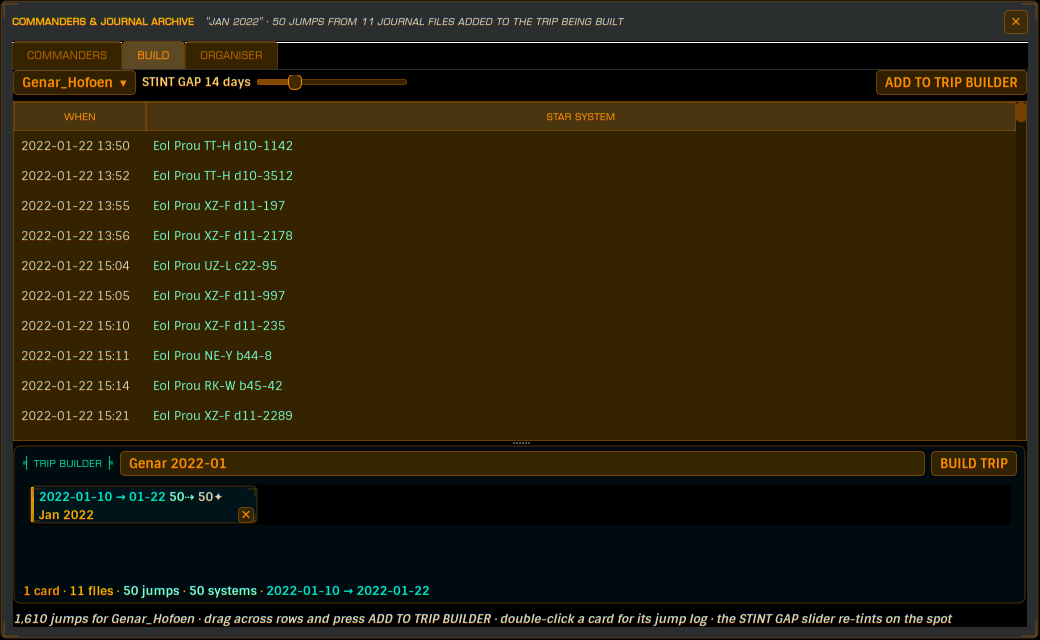
Both windows have a BUILD tab, and they're the same tool with one difference:
- The COMMANDERS window's page is free - the COMMANDER button at the top is a menu: pick anybody's name and build anybody's trip.
- The TRIPS window's page is locked - the name at the top is whoever the game says is flying, shown as a title rather than a menu, and the page follows the game on its own. You cannot be handed somebody else's flying by accident there.
A BUILD page shows every jump in a commander's journal archive, oldest first - WHEN and STAR SYSTEM, one row per hyperspace jump - and turns the runs of jumps you select into a trip. Hover a row for its exact timestamp, which journal file it came from, and which stint it belongs to.
The page stores nothing: every visit re-reads the archive, so the newest jump you made is simply there. Only journals that contain jumps are read - a journal full of docking, shopping and scanning the system you already arrived in cannot add a row, so it's skipped.
- The STINT GAP slider groups your playing into stints - stretches with no quiet break longer than the slider inside them - and tints alternating stints different colours, so a week-long hyperspace spree reads as one block at a glance. Moving it re-tints on the spot; it changes nothing else.
- Select a run of rows (click and drag, or click then shift-click) and press ADD TO TRIP BUILDER. The selected jumps are cut into a jump card and move down into the tray. You can only select jumps after the last card you made - the table works forward through your history - so every card is one unbroken run of flying, and no run can be built twice.
- Each jump card shows the pick's dates, jump count and systems reached, a sparkline of jumps per month, and a name generated from its dates. Double-click a card for its jump log - the full where-and-when list, which stays while you read it. A card's ✕ puts its jumps straight back into the table, bright and ready to re-pick.
- The TRIP BUILDER tray adds up what the cards contain - files, jumps, unique systems and the combined date span - counting a journal that fed two cards only once.
- BUILD TRIP names the new trip (a suggestion is pre-filled - overwrite it freely), files it in that commander's folder, assigns it to them, and parses the journals into it with a progress bar and a CANCEL. Only the selected jumps' time windows are imported - a journal that straddles the edge of your pick contributes just what lies inside it. A cancelled or failed build asks whether to keep the part-filled trip or throw it away; either way the jumps go back where they came from, ready for another go. A finished build switches to the new trip and clears the page for the next one.
The Journal File Organiser
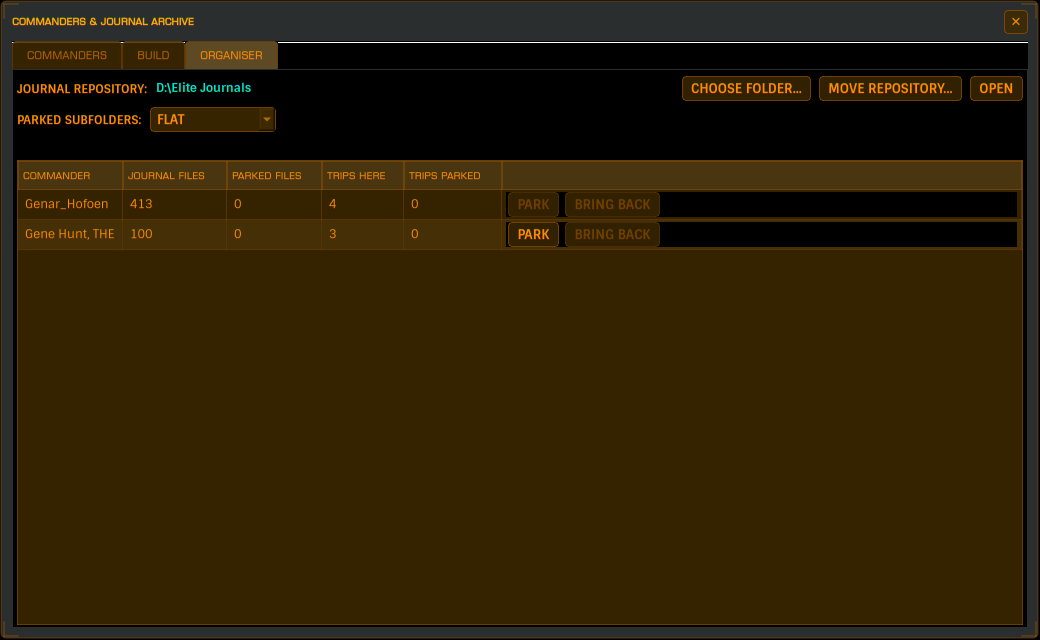
The COMMANDERS window's ORGANISER tab moves one commander's journal files - and their trips - out of your game folders into a repository folder of your choosing, and brings them back. It exists for the pile that accumulates when you keep other people's journals around: a friend's debug files, an old save you're not playing any more. Parking tidies the card wall without deleting anything.
- The repository is one folder you pick the first time the tab is opened (or with CHOOSE FOLDER...); inside it, each commander gets a folder named after them. The table lists every commander with their live journal file count, parked file count, trips and parked trips - one PARK / BRING BACK pair per row.
- PARKED SUBFOLDERS decides how parked journals are filed inside the commander's folder - all flat, one folder per year, or one per month - always dated by the journal file's own opening date, never by your trips' dates. MOVE REPOSITORY... moves the whole parked collection to a new home and re-points Captain's Log at it - including any parked folders you kept as journal sources, so a ticked card keeps its tick after the move. OPEN shows the repository in your file manager.
- PARK asks first, and the question spells out the whole deal: how many journal files, over what dates, how many trips, and the exact folder they're going to. Journal files travel from every configured folder, not just the game's; trips land in a Trips folder inside the commander's parked folder, still owned by the same commander. Afterwards the commander's card leaves the wall - their journals are in no source and their trips are in no data directory.
- A tick box in the confirmation lets you keep reading the parked folder as a journal file source - the files stay in the repository but keep being counted, and the card stays on the wall with its numbers. Parked-and-unread is the tidy state; parked-and-read is just filing with extra steps.
- BRING BACK reverses it: journals go home to the game's folder (dated subfolders flatten on the way), trips go back into the data directory filed under their commander, and the card returns with its totals rebuilt from the files themselves. The parked folder is tidied away only when genuinely empty.
- Nothing about parking is remembered in a database - the state is where the files sit. Move them yourself with a file manager and the app's next scan agrees with what you did.
- If you do move them yourself, leave a window open. Files parked where Captain's Log cannot read them are files that have stopped existing: the cards lose their totals, the BUILD pages go quiet, and the live commander check cannot see that commander loading the game. Add your archive as a journal source too - duplicates across folders are only counted once - or just park with the keep-reading tick, which is that arrangement done for you, with a BRING BACK button.
- The guards: nothing moves while Elite's window is up; never the commander the game says you're flying; never the owner of the trip Captain's Log has open (switch first); a parked folder belonging to a different commander, or a name clash, is refused by name. The guards are checked again when you answer the confirmation, not just when it's asked. While a move runs, both windows refuse to close - a closed window takes its progress bar with it.
Choosing a repository folder inside a folder Captain's Log already reads as journals is refused up front - parked files there would be scanned straight back as live ones.
Deleting a trip
DELETE TRIP lives in the trip's right-click menu - or in its commander's card menu, which is the only way to reach a trip belonging to somebody who isn't flying right now. It's greyed on the trip Captain's Log has open; switch to another first. The confirmation tells you how many jumps and systems are in there and what dates it covers before it asks, because "delete Guardians 003?" is a thin way to decide to bin two years of flying.
What never appears as a trip
Captain's Log's own databases are not trips and cannot become ones: GALAXY.db (the shared star database), EDSMStarData.db and cl_values.db - checked by name and by contents, because a copy named something innocent can still be holding fifteen megabytes of star systems. You can't create a trip called Galaxy, and any file containing the star database's tables is refused for switching, assigning and deleting, whatever it's named. The old v2default scratch file is no longer special either: it gets claimed and filed like any other legacy trip - but the name stays Captain's Log's, so you can't create a new one.
A note on identification
Captain's Log identifies commanders by the Frontier ID in your journal files, because CMDR names get re-cased and reused. That ID is never displayed anywhere in the app - it is used internally to keep your flying in the right pile, and only the commander's name is ever shown.